

What Are ChatGPT Prompts? A Beginner’s Guide to Writing Better Prompts
Have you ever typed something into ChatGPT, got a strange answer, and thought, “That’s not what I meant.”
You are not alone.
Most of the time, the problem isn't ChatGPT. The problem is the way the request was written.
That request is called a ChatGPT prompt.
A prompt tells ChatGPT what you want it to do. It can be as simple as “Write an Instagram caption” or as detailed as “Write five Instagram captions for a real estate brand in Ahmedabad, using a friendly tone and keeping each caption under 100 words.”
The second prompt gives ChatGPT much more direction. Naturally, the answer is usually better too.
In this beginner's guide, we'll explain what ChatGPT prompts are, how ChatGPT prompts work, how to write better prompts, common mistakes to avoid, and practical prompt examples you can actually use.
What Is a ChatGPT Prompt?
A ChatGPT prompt is the instruction, question, command, or information you give to ChatGPT to get a response.
Think of it like talking to another person.
If you walk into a shop and say:
“Give me something.”
The shopkeeper has no idea what you need.
But if you say:
“I need a lightweight black backpack for daily office use, preferably with a laptop compartment.”
Now the requirement is clear.
ChatGPT works in a similar way.
The more useful context you provide, the easier it becomes for the AI to understand what you're trying to achieve.
A prompt can include:
- A question
- A task
- Background information
- Examples
- Formatting instructions
- Tone or writing style
- Target audience
- Restrictions or requirements
- Desired output
So, a prompt ChatGPT receives is essentially your starting point for the conversation.
What Does a ChatGPT Prompt Do?
A prompt gives ChatGPT direction.
For example, you could simply type:
“Write about digital marketing.”
ChatGPT can answer that, but the topic is extremely broad.
Now try:
“Explain digital marketing to a small business owner who has never used online advertising. Keep it simple and give five practical examples.”
That's a much stronger ChatGPT AI prompt.
Why?
Because you've told ChatGPT:
- The subject — digital marketing
- The audience — small business owners
- Their knowledge level — beginner
- The purpose — explanation
- The style — simple
- The format — five examples
You aren't making ChatGPT guess.
And that is the basic idea behind effective prompting.
Why Are Prompts ChatGPT Important?
ChatGPT can generate text, explain concepts, brainstorm ideas, summarize information, help with coding, create outlines, and assist with many everyday tasks.
But it needs direction.
A vague request can produce a vague answer.
A clear request gives the model more useful information to work with.
For example:
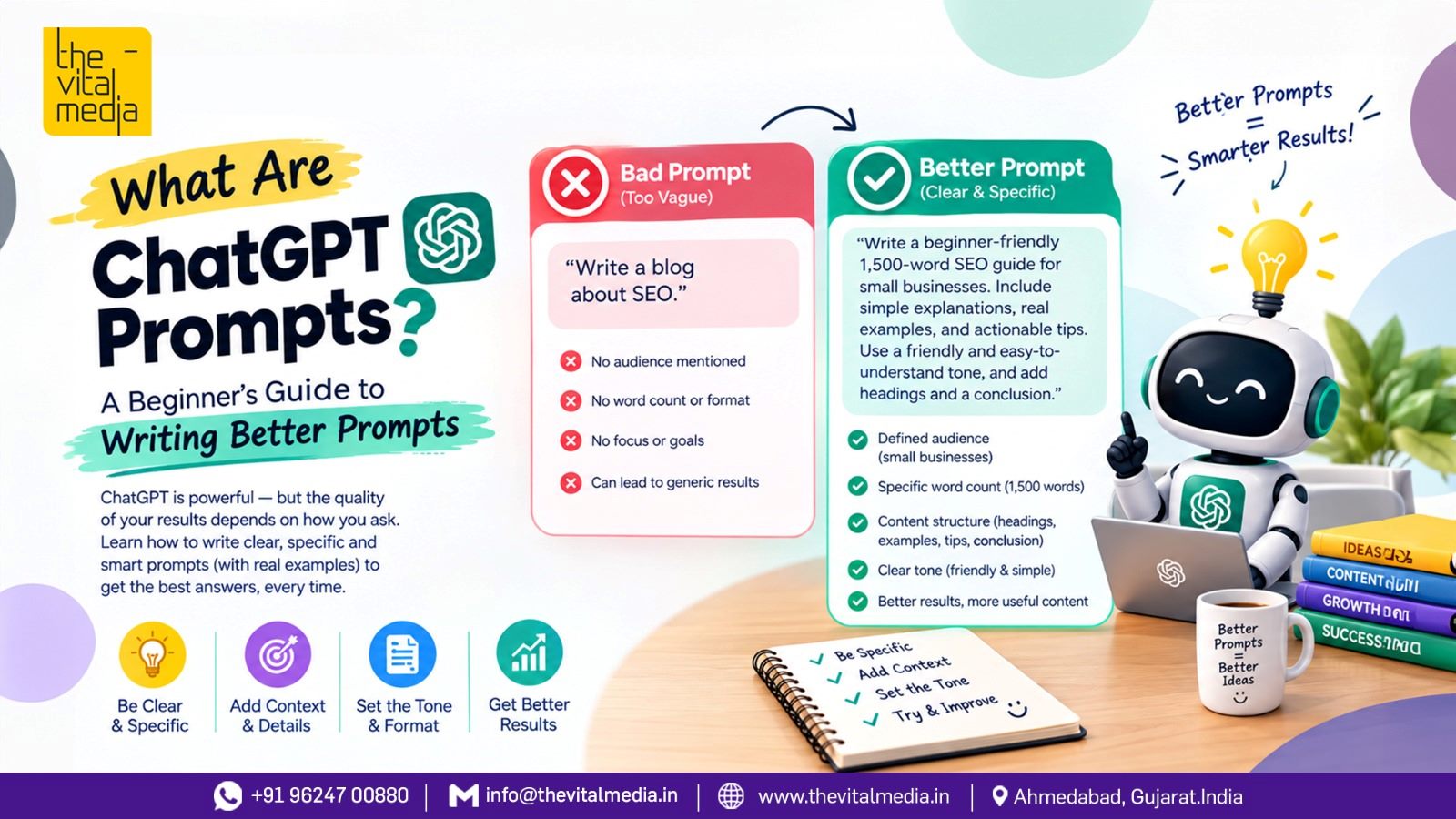
Weak prompt
Write a blog about SEO.
Better prompt
Write a 1,500-word beginner-friendly blog explaining SEO to small business owners. Use simple language, include practical examples, explain on-page and off-page SEO, and finish with a short checklist.
The second version gives ChatGPT a clearer job.
This doesn't mean longer prompts are always better.
Clear beats complicated.
Difference Between Better ChatGPT Prompt VS Week ChatGPT Prompt
What Makes a Good ChatGPT Prompt?
A good prompt doesn't need to be huge. It needs to contain the information that actually matters.
Here are the main elements.
1. Give ChatGPT a Clear Task
Start by saying exactly what you want.
Instead of:
Marketing ideas.
Try:
Give me 10 social media marketing ideas for a local restaurant.
The second request has an actual job attached to it.
2. Add Context
Context helps ChatGPT understand the situation.
For example:
I run a small clothing store that sells affordable casual wear to customers aged 18–35. Give me 15 Instagram content ideas.
Now ChatGPT knows something about the business and audience.
Without that information, the response may be generic.
3. Define Your Audience
Who is going to read, watch, or use the output?
Mention it.
For example:
Explain artificial intelligence to a 12-year-old student.
is very different from:
Explain artificial intelligence to a software engineer.
The subject hasn't changed.
The audience has.
4. Tell It How You Want the Answer Structured
If you want a particular format, say so.
For example:
Give me the answer as a table with three columns: Problem, Solution, and Example.
Or:
Give me 10 bullet points followed by a short summary.
This is particularly useful when you're creating content, reports, social media posts, or business documents.
5. Mention the Tone
You can ask for a particular writing style.
- Friendly
- Professional
- Casual
- Conversational
- Educational
- Persuasive
- Simple
- Technical
- Storytelling
Instead of:
Write a product description.
Try:
Write a friendly product description for first-time buyers. Avoid exaggerated claims and keep the language simple.
That's a much more useful prompt chat GPT.
A Simple Formula for Writing Better Prompts
If you're new to prompting, don't overthink it.
Try this basic formula:
Task + Context + Audience + Requirements + Format
For example:
Task: Write a blog
Context: The blog is about Instagram marketing
Audience: Small business owners
Requirements: Beginner-friendly, practical examples, no complicated jargon
Format: Use H2 and H3 headings with a short FAQ section
Put it together:
“Write a beginner-friendly blog about Instagram marketing for small business owners. Explain the basics in simple language, include practical examples, avoid complicated jargon, and use H2 and H3 headings. Finish with five FAQs.”
That's already a solid ChatGPT prompt.
ChatGPT Prompt Examples for Everyday Use
You don't need to be a technical person to use prompts.
Here are some practical examples.
ChatGPT Prompt for Writing an Email
Write a polite email to a client explaining that their project deadline needs to be extended by three days. Keep the tone professional and honest. Don't make excuses.
ChatGPT Prompt for Learning
Explain photosynthesis to me like I'm a beginner. Use a simple real-world example and then give me five questions to test my understanding.
ChatGPT Prompt for Content Ideas
Give me 20 blog topic ideas for a digital marketing agency targeting small businesses in Ahmedabad. Group them into SEO, social media, Google Ads, branding, and website marketing.
ChatGPT Prompt for Social Media
Create 10 Instagram post ideas for a local café. Keep them casual and engaging. Include a suggested caption and a simple CTA for each post.
ChatGPT Prompt for SEO
Analyze the search intent behind the keyword “digital marketing agency in Ahmedabad.” Suggest a content structure including H1, H2s, FAQs, related keywords, and internal-link opportunities.
ChatGPT Prompt for Summarizing
Summarize the following article in five bullet points. Keep important statistics and examples. Then give me a two-sentence takeaway.
ChatGPT Prompts for Better Writing
ChatGPT can also work as an editing partner.
Instead of simply saying:
Improve this.
Give it more direction.
For example:
Rewrite this paragraph so it sounds natural and conversational. Keep the original meaning, remove unnecessary repetition, and make it easier for an 8th-grade reader to understand.
You can also ask ChatGPT to:
- Correct grammar
- Improve sentence flow
- Simplify technical language
- Make writing more persuasive
- Change the tone
- Shorten content
- Expand an idea
- Create headlines
- Turn paragraphs into bullet points
The key is to tell it what kind of improvement you want.
Note: Original Prompt is from ChatGPT
What Is a ChatGPT AI Prompt?
The term ChatGPT AI prompt generally refers to an instruction given to ChatGPT to generate a particular response or perform a particular task.
It doesn't have to be complicated.
For example:
“Give me three dinner ideas using eggs, potatoes, and spinach.”
That's an AI prompt.
So is:
“Act as a marketing consultant and create a 90-day digital marketing strategy for a small ecommerce business with a limited advertising budget.”
The difference is complexity, not the basic principle.
Common ChatGPT Prompt Mistakes
Writing prompts isn't difficult, but beginners often make a few mistakes.
Being Too Vague
Bad:
Write something about marketing.
Better:
Explain three digital marketing strategies that a local service business can use to generate leads.
Giving Too Many Unrelated Instructions
A prompt can also become confusing when you throw everything into one giant paragraph.
Keep instructions organized.
Use bullets when necessary.
For example:
Write a blog about email marketing.
Audience: Small business owners
Tone: Friendly
Length: 1,200 words
Include: Examples, benefits, mistakes, FAQs
Much easier.
Assuming ChatGPT Knows Your Goal
Don't make it guess.
If the output is going to be used for a website, tell it.
If it's for a presentation, say so.
If it's for a customer, explain the audience.
Context matters.
Do Longer Prompts Always Produce Better Answers?
No.
This is one of the biggest misconceptions about prompting.
A 1,000-word prompt isn't automatically better than a 50-word prompt.
If those extra 950 words don't provide useful information, they may simply make the instruction harder to follow.
A good prompt is specific enough to guide the response without adding unnecessary clutter.
For example:
“Give me five headline ideas for a blog about ChatGPT prompts. Make them beginner-friendly and SEO-focused.”
That's short.
But it has a clear objective.
Should You Use the Exact Same Prompt Every Time?
Not necessarily.
You can create a basic prompt template and change the details depending on your task.
For example:
“Act as a [role]. Help me [task]. The target audience is [audience]. The tone should be [tone]. Include [requirements]. Present the answer as [format].”
You could adapt this for:
- Blog writing
- SEO research
- Social media
- Business planning
- Learning
- Coding
- Customer support
- Email writing
The framework stays similar.
The details change.
Prompt ChatGPT Step by Step: A Beginner's Workflow
If you're completely new, try this simple process.
Step 1: Decide What You Want
Before opening ChatGPT, know the result you're looking for.
Do you need ideas?
An explanation?
A complete article?
An email?
A plan?
Step 2: Write the Basic Request
Start simple.
“Create a content calendar.”
Step 3: Add Important Context
Tell ChatGPT who, what, and why.
“Create a 30-day Instagram content calendar for a local fitness studio targeting working professionals.”
Step 4: Add Constraints
Now specify things that matter.
“Use a friendly tone. Include reels, carousels, and static posts. Don't use exaggerated fitness claims.”
Step 5: Choose the Output Format
For example:
“Put everything in a table with Date, Content Type, Topic, Caption Idea, and CTA.”
Now your request is much clearer.
You Can Improve a Prompt After Getting the First Answer
Here's another useful trick.
Your first prompt doesn't have to be perfect.
ChatGPT works conversationally, so you can refine the response.
For example:
First prompt:
Give me 10 blog ideas about (Your Topic ).
Then:
Make the ideas more suitable for beginners.
Then:
Focus on search intent.
Then:
Turn idea number 3 into a detailed outline.
Then:
Now write the introduction in a conversational tone.
You're gradually steering the conversation toward the result you want.
That's often easier than trying to create one enormous prompt from the beginning.
ChatGPT Promt vs ChatGPT Prompt: Does Spelling Matter?
You may see people searching for terms such as “Chat gpt promt,” “Chatgpt promt,” “Prompt chatgpt,” “Prompt chat gpt,” or “Chat gtp prompt.”
The correct spelling is prompt.
And the product name is ChatGPT.
So, the standard phrase is:
ChatGPT prompt
However, people naturally make spelling variations when searching online. The important thing is not to write incorrect variations unnaturally throughout an article.
Good SEO content should satisfy the person behind the search—not simply repeat every possible spelling.
Advanced ChatGPT Prompt Techniques
Once you're comfortable with basic prompts, you can go a little further.
Give Examples
If you want a particular type of output, show ChatGPT an example.
For instance:
Here is an example of the writing style I like: [example]. Create a new paragraph using a similar level of simplicity, but don't copy the wording.
Examples can make your expectations much clearer.
Ask for a Specific Role
You can provide a useful perspective.
For example:
Act as an SEO strategist helping a small ecommerce business.
This can help frame the response around the type of expertise you want.
But remember: simply writing “Act as an expert” doesn't magically make every answer accurate. Your actual context and instructions still matter.
Ask It to Challenge Your Idea
You can also use ChatGPT for critical thinking.
Try:
Review my marketing plan. Identify three weaknesses, explain why they could become problems, and suggest practical improvements.
That's more useful than simply asking:
Is my marketing plan good?
A Reusable ChatGPT Prompt Template
Here is a simple template you can save:
Task: [What do you want ChatGPT to do?]
Context: [What background information does it need?]
Audience: [Who is this for?]
Goal: [What result do you want?]
Tone: [How should it sound?]
Requirements: [What should it include or avoid?]
Format: [How should the final answer be presented?]
You don't have to fill every section every time.
Use the parts that actually matter.
10 Quick Tips for Writing Better ChatGPT Prompts
- Start with a clear task.
- Give relevant context.
- Tell ChatGPT who the audience is.
- Explain the desired outcome.
- Specify important constraints.
- Choose a useful format.
- Give examples when style matters.
- Avoid unnecessary information.
- Refine the answer through follow-up prompts.
- Check important facts instead of blindly trusting AI output.
That last point matters.
ChatGPT can be extremely useful, but generated information can still contain mistakes. For important decisions, verify facts using reliable sources.
Frequently Asked Questions About ChatGPT Prompts
What is a ChatGPT prompt?
A ChatGPT prompt is the question, instruction, or information you provide to ChatGPT to generate a response or complete a task.
How do I write a good ChatGPT prompt?
Start with a clear task, then add useful context, audience, requirements, tone, and desired output format. You don't need to make the prompt unnecessarily long.
What is the best prompt for ChatGPT?
There isn't one universal “best” prompt. The right prompt depends on what you're trying to accomplish. A good prompt clearly explains the task and gives ChatGPT the information needed to produce the desired result.
Can beginners use ChatGPT prompts?
Yes. You don't need programming knowledge to write prompts. A simple question can be a prompt.
Do ChatGPT prompts need to be long?
No. Short prompts can work extremely well when the task is simple and clearly stated.
Can ChatGPT prompts help with SEO?
Yes. Prompts can help with keyword research, content planning, outlines, competitor analysis, FAQs, content optimization, and many other SEO tasks. However, human review and factual verification are still important.
Can I reuse a ChatGPT prompt?
Yes. Templates are particularly useful for repetitive tasks. Change the context and requirements whenever your objective changes.
Final Thoughts
A ChatGPT prompt is simply the instruction you give the AI.
Nothing mysterious.
The real skill is learning how to explain what you actually want.
Start with the task. Add context. Tell ChatGPT who the answer is for. Mention important requirements. Choose the format. Then improve the response through follow-up questions.
You don't need complicated “secret prompts.”
You need clear communication.
And once you understand that, ChatGPT becomes much easier to use—not only for writing, but also for learning, brainstorming, research, planning, marketing, and everyday work.
So the next time ChatGPT gives you an answer that feels completely off, don't immediately blame the AI.
Try changing the prompt.
Sometimes, a better question is all it takes to get a better answer.

Great marketing isn’t about noise, it’s about measurable growth built on trust.